Upgrading my Synology NAS to the DS225+
I've had a NAS for about 18 months now, ever since I was able to get an old Synology DS216se second-hand. I had wanted to control & manage my own media library instead of relying on streaming services, especially as licencing issues mean that certain movies or albums weren't available over time. I also started to get sick of the algorithms that prioritised a certain way of listening or watching media; having direct control was more important to me.
I had held onto an old 1TB external hard drive which had my music collection and a smattering of ripped DVDs and TV series, so I wasn't starting from zero. In my opinion, this is the biggest requirement for someone to consider getting a NAS. If you don't have a large collection of files, just stick to your desktop PC or laptop.
Despite being fairly old (it released in 2015), the DS216se was good enough for me to set up a Plex server and play music within my home network or on the go, but it struggled at video playback. Only SD-quality movies with certain video codecs were playable, as the fairly weak processor didn't support hardware transcoding. I don't watch a lot of TV shows or movies so it wasn't a dealbreaker, but when a decent portion of your media library is inaccessible it was still frustrating. Regardless, getting a cheap NAS gave me some handy experience in managing a home server and understanding how much processing power you really need to do what you want.
After the Plex server was in a good place I didn't have to set up much else – the only point of note was that I had to call up my ISP and get them to remove the double-NAT configuration on my account, which allowed me to access the Plex server remotely.
More recently I started to migrate old photos out of Google Photos and onto the NAS, using Synology's own Photos application.
Upgrading to the DS225+
I had been looking at upgrading the NAS over the last 4-6 months, using the Plex compatability list as a reference for which Synology models would support which video formats. I wanted to stick with Synology mainly for the DSM operating system; it's quite user-friendly. My focus was on improving the server performance, not giving myself a huge to-do list of server configuration & maintenance tasks.
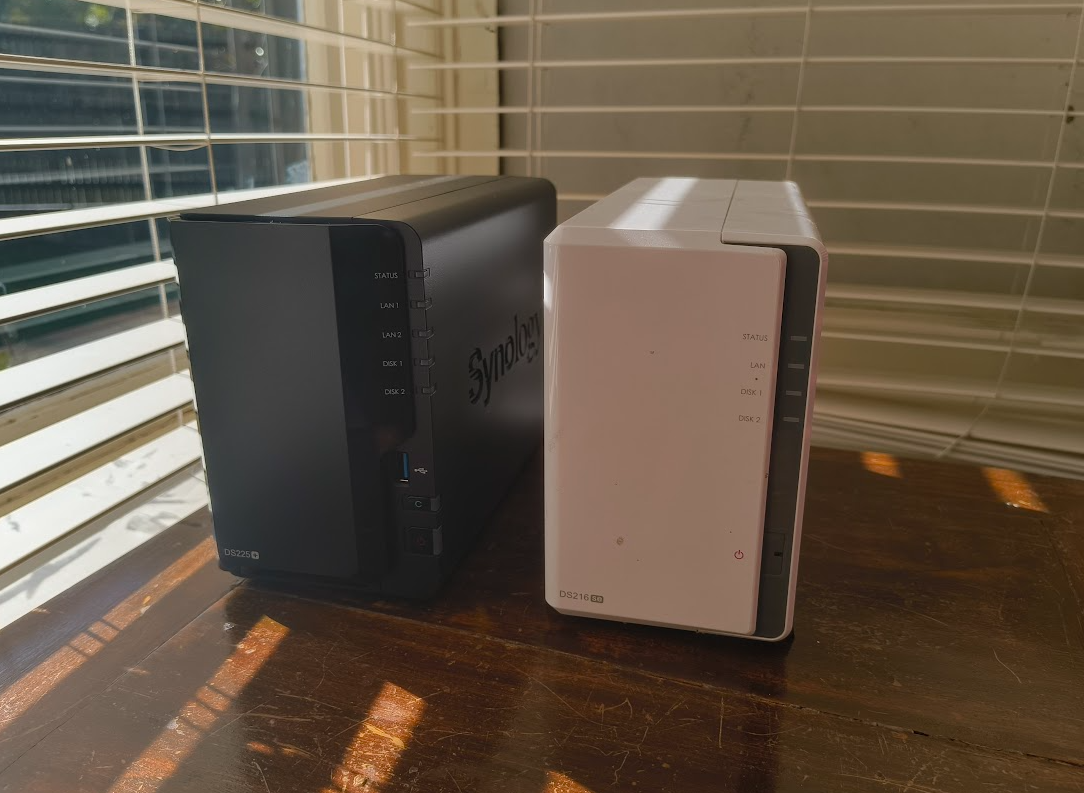
I bought the DS225+ for a bit over $AUD500, and after performing a full backup of all my data (and transferring it onto my home PC) I took the hard drives out of the old NAS, and into the new one. I followed this process on Synology's website, which was helpful in understanding model & hard drive compatability.
I was concerned that the data on the drives would get blown away and I'd have to restore data from my backup, but fortunately after identifying the new device it immediately read the drive as 'Migratable', so it could use that data immediately. Huge sigh of relief! After updating the OS to the latest version, I was able to jump in and confirm that everything worked correctly.
As far as my home network was concerned, I only had to enforce a static IP address on the new NAS, update the port forwarding for the Plex server for the new IP address, and update a few bookmarks. Everything else was retained. As per Synology's own recommended process, I had taken a backup of the system configuration (into a handy-dandy .dss file) but the setup process was able to maintain the configuration from my old NAS, so that was one less step before I was up-and-running.
Dealing with Synology enshittification
It wasn't perfectly smooth sailing, of course.
I mentioned at the start of the article that I wanted a stronger home media server to play videos at higher qualities, so there was a few furrowed brows and slight frowns when I jumped into Plex and started testing out some HD movies in my library. I'm sure most people have had that disappointing feeling of spending lots of money on technology assuming it'll do what you want, and then realising after you open up the box at home that it's not the full story.
Almost every movie or TV show I opened in Plex presented the haunting error: “This server is not powerful enough to convert video.”
After a few minutes of confusion and testing different videos, I remembered that during my purchasing research I came across a recent change by Synology that disabled hardware transcoding on some of their most recent models. It wasn't a hardware limitation; it was something disabled in the kernel that stopped clients accessing the transcoding feature. The DS225+ that I bought was one of those affected models.
Fortunately, the self-hosted community out there on the Internet came to the rescue – there is a script that you can run that enables transcoding, and you can set it up within DSM to run on startup. All of the details are in this article.
It only took 5 minutes to sort out, and after restarting the NAS and confirming that the task ran the script successfully on bootup, all of my videos were playable. Hooray!
Future improvements
So while I've got the performance boost that I wanted (accessing the server is super-fast compared to the 216se), there are still some other improvements I want to make:
- I need to look into the fan sound; it's definitely louder than the old model. Apparently there's some noise deadening I can do by putting velcro on the feet of the case, or some other acoustic shenanigans around where it's located in the house. It might even be that the processor is running at a high baseline, even when it should be idle. Don't know yet.
- It's definitely time to get a regular backup task going, and ensure I'm backing up the data offsite (working towards following the “3-2-1” approach!) – it doesn't need to be more than monthly.
- The NAS, router & modem are neatly out of the way but the cable management & airflow around them could be improved. They are off the ground but they still collect dust which isn't ideal. A generic case of some description will do the job, or maybe I can get a friend to 3D print something bespoke.
- Work out what's wrong with my 2nd hard drive – I had one Seagate drive that I got replaced under warranty, but the replacement drive also doesn't seem to work. It's readable by the NAS, but it fails to add the drive to the storage pool for some reason. Fortunately it's only a backup drive (I'm aiming to set up RAID 1 configuration) and doesn't affect day-to-day operations, but it'd give me more peace of mind incase the other drive fails (which it will, eventually).
But for now, I've got a bunch of old TV shows to rewatch! Here's to self-hosted media libraries!